How to Enable Bee Developer Mode on Android
If you have an Amazon Bee wearable and want to use the Bee CLI, API, or MCP server, you first need to turn on Developer Mode in the Bee app. The official developer docs only describe the iOS steps, and the Getting Started page even says the iOS app is required. It isn’t: Developer Mode works on Android too, and bee login succeeds afterward. The setting just isn’t where the docs suggest, and I couldn’t find the Android steps written down anywhere. Here’s what worked for me.
Tested on: Google Pixel 9, Bee Android app v1.0.3, October 2026. Everything happens inside the Bee app, so other Android phones should work the same way.
Steps
1. Open your profile
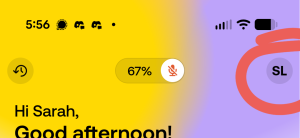
On the Bee app’s home screen, tap your initials in the top-right corner.
2. Scroll down to About
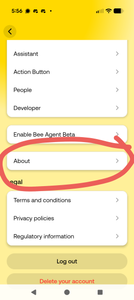
This opens a settings list. Near the bottom, below “Enable Bee Agent Beta” and just above the Legal section, tap About.
3. Tap the app version five times
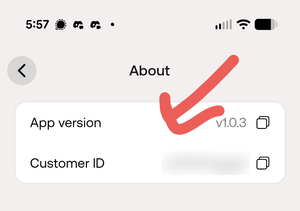
The About screen shows your App version and Customer ID. Tap the App version row five times quickly. It took me a few tries to get it to register, so if nothing happens, try again a little faster.
4. Check that it worked
Go back to the settings list. A new Developer entry should now appear right below People; you can see it in the screenshot from step 2, which I took after unlocking it. If it’s there, Developer Mode is on.
Next steps
With Developer Mode on, install the Bee CLI and log in:
npm install -g @beeai/cli
bee login
bee status
From there, the Bee developer docs cover the CLI, the HTTP API, real-time event streaming, and the MCP server for connecting Bee to Claude and other AI tools.
Why I wrote this
The official docs say to tap the version row five times in Settings and primarily reference iOS, but on Android the version row isn’t on the main settings screen. It’s one level down, under About. If you tap the phone’s own Android build number instead, you’ll turn on Android’s developer options, which won’t help with Bee at all.